renderable splines?

Messages
9
renderable splines?

hi
was wondering if there is any way to make splines renderable in cheetah?
in other words, it would be nice if there was a way to render wire frames as wire frames. alternatiively, it would be interesteing if there could be a "make lattiice" option that would allow the user to give real geometry to the wire frames

thks!

adam

 
hi
was wondering if there is any way to make splines renderable in cheetah?
in other words, it would be nice if there was a way to render wire frames as wire frames. alternatiively, it would be interesteing if there could be a "make lattiice" option that would allow the user to give real geometry to the wire frames

thks!

adam
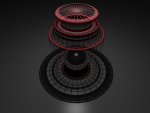
You can't render splines but you could make very thin polygon objects. You can display geometry as wireframe in the 3D view or you could view editable polygons as isoparams. The example below uses thin very thin polygons.
 

Attachments

  • test.jpg
    test.jpg
    67.1 KB · Views: 681
Hi.
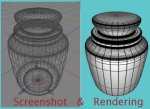
A very quick workaround for the first part of your question is to make you object editable and go to the UV-editor. Select your all polygons of your object and save all UVs to pdf. Open it with preview and save as png, tif or jpg. Back in Cheetah3d generate new material and load your new saved pic into the texture channel. Apply to your awaiting object ans voil\'87. There is your wireframe.
You have full control to your wireframe by changing "style ->wireframe" while modeling. Every tesselating will give you a feedback to your mesh.
Your second question is lost in translation, sorry.

With kindest regards
Frank Beckmann

BTW: we had this already sometime ago. You can search the forum for topics like that. Thanx.
http://cheetah3d.de/forum/showthread.php?p=4397&highlight=wireframe#post4397
 

Attachments

  • Wireframe.jpg
    Wireframe.jpg
    58.1 KB · Views: 610
Hi.
A very quick workaround for the first part of your question is to make you object editable and go to the UV-editor. Select your all polygons of your object and save all UVs to pdf. Open it with preview and save as png, tif or jpg. Back in Cheetah3d generate new material and load your new saved pic into the texture channel. Apply to your awaiting object ans voil\'87. There is your wireframe.
You have full control to your wireframe by changing "style ->wireframe" while modeling. Every tesselating will give you a feedback to your mesh.
Your second question is lost in translation, sorry.

With kindest regards
Frank Beckmann

BTW: we had this already sometime ago. You can search the forum for topics like that. Thanx.
http://cheetah3d.de/forum/showthread.php?p=4397&highlight=wireframe#post4397

That's an eligant solution Frank, you could also add an alpha channel to knock out the white space.
 

Attachments

  • test2.jpg
    test2.jpg
    72.9 KB · Views: 590
Hi.
I know that, but "preview" can´t do this as far as I know. And I didn´t get the time to open up another app. So thanx.
With kindest regards
Franx
 
Preview help

Hi.
I know that, but "preview" can´t do this as far as I know. And I didn´t get the time to open up another app. So thanx.
With kindest regards
Franx

I don't use preview that much, how did you add text to your images in Preview?

Andrew:)
 
Huh, get caught!

Andrew!

I meant another additional app, that can handle alphas.

With kindest regards
Frank
 

Attachments

  • Wireframetile.jpg
    Wireframetile.jpg
    52.9 KB · Views: 611
Last edited:
Back
Top