
You are using an out of date browser. It may not display this or other websites correctly.
You should upgrade or use an alternative browser.
You should upgrade or use an alternative browser.
Neon lights!
- Thread starter peer
- Start date

Re: Neon lights!
Hi Peter,
I agree but beside this, nice start with neon lights ! I was in fact watching real neon lights earlier today thinking of what I had to do to model them. Your colors are great. I think what's maybe missing is the soft shadow around the tube to make it look like a real tube. Have you tried the membrane shader ?
peer said:There are so many great features in version 3, you've got to upgrade/buy
Hi Peter,
I agree but beside this, nice start with neon lights ! I was in fact watching real neon lights earlier today thinking of what I had to do to model them. Your colors are great. I think what's maybe missing is the soft shadow around the tube to make it look like a real tube. Have you tried the membrane shader ?

- Messages
- 3,706
Is 3.0 out now ?
Is 3.0 out now? I din't see it announced.
Is 3.0 out now? I din't see it announced.


peer
0
- Messages
- 815
haha, thanks Trevor. The text is just a plain textspline and a circle with loftmodifier, so I have to convert it to a mesh first to create the correct kernel!! Francois the membrane material doesn't have a emission parameter, so that won't work. I also tried a slightly transparent material but that doesn't really improve it.
peer said:Francois the membrane material doesn't have a emission parameter, so that won't work. I also tried a slightly transparent material but that doesn't really improve it.
Peter,
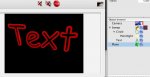
I only suggested the membrane material based on an earlier test that I thought was going in the right direction. But I didn't go further because of time limitations. Here is the quick test I did at that time. But I agree that this may not be the right way of doing it
Attachments
peer
0
- Messages
- 815
Yes unfortunatly no emission in the membrane material. I can use Photoshop for postglow. Maybe it would be possible to set the falloff for a material, but that won't make it to version 3.0 I guess. Is it possible to make a plugin for posteffects like motion blur and glow within Cheetah?
Regards,
Peter
Regards,
Peter
peer said:Yes unfortunatly no emission in the membrane material
Martin,
Is this something that could be done easily with a new shader ? Or how do you think this could be done ?
Thank you for the answer

TimD
0
- Messages
- 570
peer
0
- Messages
- 815
Nice one Tim!! How did you manage to get that dark edge around the neon. Is this a Photoshop trick. Is it also possible to post the original C3d render?
And yes it's to bad you can't use a neonlight as an arealight or something. The light emitted is not strong enough, but it works for nightscenes I guess.
Regards,
Peter
And yes it's to bad you can't use a neonlight as an arealight or something. The light emitted is not strong enough, but it works for nightscenes I guess.
Regards,
Peter
TimD
0
- Messages
- 570
Peter --
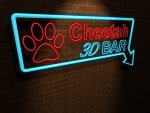
I rendered out the neon tube on its own -- completely black background, then channel-masked it over the original render. The glow was applied to this 'floating' layer -- I think that's where the dark line comes from...it's an artifact
Can't find the original at the moment...am off to ride the track for a few days...will post when I get back.
I rendered out the neon tube on its own -- completely black background, then channel-masked it over the original render. The glow was applied to this 'floating' layer -- I think that's where the dark line comes from...it's an artifact
Can't find the original at the moment...am off to ride the track for a few days...will post when I get back.

joste
0
- Messages
- 27
Hi,
This is cheetah3D file to play about with. You can give the glow material alot more glow by setting the specular color but, it has a side effect of showing up the plane that should be transparent. Give it a try and see what I mean.
http://myweb.tiscali.co.uk/jesdesign
This is cheetah3D file to play about with. You can give the glow material alot more glow by setting the specular color but, it has a side effect of showing up the plane that should be transparent. Give it a try and see what I mean.
http://myweb.tiscali.co.uk/jesdesign