big texture problems (sketchup model)

Yorky

0
Messages
21
big texture problems (sketchup model)

Hi,
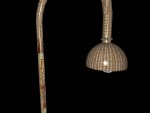
I modeled in sketchup a light and want to add materials in C3D.

I drives me nuts for a week now:

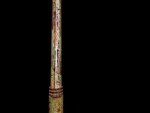
-C3D adds the material in differtent ways: beneath it seems OK, middel part: looks bad, upper part: looks horrible... And this all on the same model :frown:
It seems that sketchup exports it on a strange way... (I tried 3DS, OBJ, FBX...). What am i doing wrong here???

I also see in the render the edges of the circle, even i used lots of edges and smoothened it in sketchup.

I'm sure i do something wrong. Pls give me feedback.

Added the jas-file in attachment. For the sketchup-users: the .skp file if interested.

thank you very much!!

Yorky
 

Attachments

  • bad texture model.jas.zip
    157.3 KB · Views: 550
  • streetlight.skp.zip
    204.6 KB · Views: 520
Hi.
Just flipped normals and unconnected faces. Run it through the optimizer, flip the parts and your´re done.
Don´t know why SketchUp came up with this - but I´m pretty sure it depends on one´s modelling style somehow.

With kindest regards
Frank
 

Attachments

  • bad texture modelReviewed.jas.zip
    220.5 KB · Views: 494
Thx, still got a strange effect when adding a material. It probably has something to do with sketchup, but i followed regular modelingsteps....

The upper part of the mesh adds the material (jpg) to each polygon separatly, the middel part shows some strange lines in it, the lower part is ok.

For sketchup-users:
The lower part is just a circle (pushed up), the middel part too (but after using offset few times), for the upper part i used the 'follow me'. Nothing strange here...
 

Attachments

  • street light.jpg
    street light.jpg
    103.8 KB · Views: 1,187
  • street light2.jpg
    street light2.jpg
    63 KB · Views: 1,174
Hi,
I have no idea why one should use the SketchUp crab on UVs while building such a thing in Cheetah3d could be done within a few minutes. Sorry.
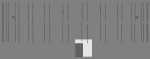
(image shows UVs of the SketchUp file)

With kindest regards
Frank
 

Attachments

  • SketchUpUVs.png
    SketchUpUVs.png
    7.6 KB · Views: 1,167
Hi,

Did you make sure your Sketchup model shows ONLY Frontmaterial (ie. white). I never experienced any problems when exporting from SU->C3D. I use .3ds bytheway. I agree with Frank that it is better to UV map from within Cheetah for this object. With plain objects is works ok to edit the textures in Sketchup.

Regards,

Peter
 
Hi,

Allthough a managed it to solve most texturing problems, i guess that sketchup has major problems with (texturing) the polygons of arcs. I posted this problem in a sketchupforum with pictures (see below).

Because i render in cheetah, maybe there's someone among you who knows the answer. I'm pretty sure the reason is sketchup...

First, i thought it was because of my modellingtechnique, but after digging in lots of tuturials, i was sure i modeled it the right way. The problem is also with (arcs on) models i downloaded from googles warehouse.

So, for me until now, sketchup is very good in modeling planes and circles, but if you model pipes with arcs and try to texture it, it really sucks. Maybe one knows the answer?

many many thanks,

the link:

http://www.sketchucation.com/forums/scf/viewtopic.php?f=15&t=11791
 
Hi Yorky.
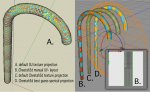
I don´t think there´s an instant-key- solution for texturing kind of arcs/tori successfully with image based textures.

With kindest regards
Frank
 

Attachments

  • ToriUVs.jpeg
    ToriUVs.jpeg
    122.4 KB · Views: 1,105
Hi Frank
A more detailed step by step tutorial on how to use Cheetah3D manual UV layout will be very cool

Regards
 
I would have thought that texturing a tube like this is better and easier with a tube created in cheetah.

As the export tubes which are created from follow me's within sketchup export triangulated an cause the kind problems that are happening here.

Regards

Luke
 

Attachments

  • tube.jpg
    tube.jpg
    64.8 KB · Views: 516
Hi Yorky.
I don´t think there´s an instant-key- solution for texturing kind of arcs/tori successfully with image based textures.

With kindest regards
Frank

Frank,

many thx,

UV-mapping is something i'm not (yet) familiar with, even i read a lot of tutorials and posts in this forum...

Do you suggest to use method B to get the best method? I see some people post model from sinks and watercranes, textured with beautifull shining metal...

Can i be right if i say that models modeled within c3d are more easy to texture than model imported from sketchup?

Is a 'manual UV layout' something different than texture projection? (do you mean: making pdf, paint in photoshop, re-import...)?

regards,

Yorky
 
Hi Luke

The faces who aren't triangulated within sketchup aren't triangulated when you export at fbx format.

Best regards
 
Manual UV layout means, in essence, manually dragging the UVs around. If you go into C3D's UV Editing layout you'll see what we mean.

This tutorial:
http://www.cheetah3d.de/forum/showthread.php?t=1724

Covers UV editing at a fairly introductory level (I'm sure Andrew covers it much more thoroughly in his training videos). Unfortunately, the tutorial covers UV editing on a fairly tightly constructed model (i.e. it doesn't have a buttload of automatically generated faces to deal with).

Manually editing UVs needn't be horribly painful. What you can do is select a bunch of faces then use the UV Mapper tool (Tools > UV > UV Mapper) to map a bunch of faces at a time. E.g. you could select the curved (handle?) part of the cane shape and use a cylindrical map on that part.
 
It appears a little problem with my SU model exported at .fbx:
Some faces are disconnected.
Is there a way to reconnect them :confused:

Thanks a lot

regards
 
Some faces are disconnected.
Is there a way to reconnect them

Ideally, figure out how not to disconnect them on export -- I don't use Sketchup so I can't help there.

To combine a bunch of meshes into one, pick one to be the "parent", drag the others "into" it (so they become "children") then select the parent and Tools > Import Children. Then delete the children.

After doing this, it's a good idea to use Tools > Polygon > Optimize and then click OK (after setting the parameters if required). This connects polygons which ought to share vertices within a single mesh.
 
Hi Podperson

Thanks for the help

Just optimize worked fine and removed lot of double point and now all is fine and I can easilly unwrap my mesh.

Here is the fbx file

regards
 

Attachments

  • essai_texture_arc.fbx.zip
    24.7 KB · Views: 506
Back
Top