Cheetah3D 4.2 Beta 1

Martin

Moderator
Messages
9,479
Cheetah3D 4.2 Beta 1

Hi,
here is the first 4.2 beta. As you can see on the feature list below this release mainly focuses on the renderer. Especially the new gamma correction feature and the much increased area lights should help to render even better images. I will give some more comments about some of the new features later. And tips how to use them best.


Code:
-added Connexion3D Space Navigator support
-added sky light
-added under- and oversampling (replaces supersampling)
-added bucket based rendering
-added pixel filtering (gauss)
-added gamma correction (new scenes with default 1.8)
-added orhtographic projection rendering
-added soft shadows to point light
-added display of light geometry to point and area lights
-added "clamp color" property to render settings to avoid aliases at super bright pixels
-added color support to STL export (VisCam and Magic encoding)
-add materials to more than one object at once
-increased blured reflections performance and quality
-increased soft shadow performace and quality (16 samples should be enough for most scenes)
-increased raydepth max. to 24
-improved "edge" antialiasing mode (is default in new scenes)
-physically correct area lights
-fixed grey boarder bug when rendering scene with transparent background
-no "copy copy copy" names any longer when copy&pasting objects
-pasted object will be added near the selected object
-fixed bug when Helvetiva font is not installed
-fixed two bugs in crumple tool
-fixed bug in "Split" tool
-fixed bug in irradiance cache which caused round spots artifacts
-"SHIFT+Object drag" doesn't modify object coordinates

Please be aware that this is beta software. So don't use it with important data.!!!

You can find the beta at

http://cheetah3d.com/download/Cheetah3D4.2b2.zip

Please post your experiences with this beta in that forum thread.

Bye,
Martin
 
Last edited:
Woohoo!!! Thanks a lot. This is a great day. Our octocore is also coming today!! Can't wait to try out Cheetah!

Regards,

Peter
 
The spacenavigator works great! Also the skylight works beautifully. A quick test showed that the radiosity looks better, less noise at edges. Also the bucketrender works good. I'm going to try to render an interior with skylight only. Let's see how that turns out. Also some experimenting with materials and lights (has to wait till lunchbreak I'm afraid).

Again thanks Martin

Regards,

Peter
 
I've downloaded but the beta won't start, any suggestions?- OK found the problem, you need to have the drivers for the space navigator installed before cheetah will run.
 
Last edited:
W00t! Made may day!
But could you let the user choose the speed for space navigating?
Say:
Left Space Navigator button -> speed down
Right Space Navigator button -> speed up
 
Last edited:
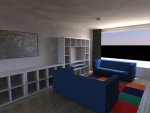
Here's a quick test with an interior that is only lit with the new skylight. It takes quite some time, because I had to set the settings fairly high to get rid of some noise. It turns out quite good though. The picture is a bit compressed due to upload limits. Now for some more testing.

Regards,

Peter
 

Attachments

  • Skylight.jpg
    Skylight.jpg
    62.9 KB · Views: 875
I've downloaded but the beta won't start, any suggestions?- OK found the problem, you need to have the drivers for the space navigator installed before cheetah will run.


Hi,
sorry for that stupid bug in beta 1. It required the Space Navigaror SDK to be installed. Beta 2 won't require that anymore and should also run on Macs which have no Space Navigator.

http://cheetah3d.com/download/Cheetah3D4.2b2.zip

I've also updated the link above.

Bye,
Martin
 
W00t! Made may day!
But could you let the user choose the speed for space navigating?
Say:
Left Space Navigator button -> speed down
Right Space Navigator button -> speed up

The speed of the space navigator can be set in the space navigator preferences in the system preferences.

Bye,
Martin
 
Here's a quick test with an interior that is only lit with the new skylight. It takes quite some time, because I had to set the settings fairly high to get rid of some noise. It turns out quite good though. The picture is a bit compressed due to upload limits. Now for some more testing.

Did you create this scene new. Because if you open old scenes they will be still rendered with a gamma value of 1.0. That was necessary for backward compatibility.
If you create a new scene it will be rendered with the default gamma value of 1.8.
If you render an old scene you can set the gamma value manually to 1.8 in the render preferences.
Gamma correction should in general help to generate better interior lightning.

Bye,
Martin
 
OK, so what is a "space navigator". I downloaded beta1, and it doesnt run, so I am now downloading beta2, But I was just wondering what it was. 4.2sounds realy cool!:cool: Also, where are the space navigator extensions, and how do you install them?
 
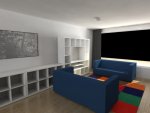
Hi Martin, It was an old scene, but I did change the gammasetting. I noticed a lot of noise with standard settings, increasing skylightshadow settings and radiosity samples helped a lot. Do you have more tips Martin?
With the help of some arealights I get such clean images (see attachment).

Regards,
Peter
 

Attachments

  • Arealights.jpg
    Arealights.jpg
    67.8 KB · Views: 497
OK, so what is a "space navigator". I downloaded beta1, and it doesnt run, so I am now downloading beta2, But I was just wondering what it was. 4.2sounds realy cool!:cool: Also, where are the space navigator extensions, and how do you install them?

The "space navigator" is a 3D navigation device with 6 degrees of freedom

http://www.3dconnexion.de/

But you don't need any extensions or drivers anymore if you use beta 2. It was a bug in beta 1 which required the instalition of the space navigator driver.

Bye,
Martin
 
Hi Martin, It was an old scene, but I did change the gammasetting. I noticed a lot of noise with standard settings, increasing skylightshadow settings and radiosity samples helped a lot. Do you have more tips Martin?
With the help of some arealights I get such clean images (see attachment).

Hi Peter,
your rendering looks really nice. Gamma corrections seems to help alot for interior renderings.
But using the skylight for interior lightning might be a little bit inefficient since it works like a hughe area light and only very few light samples might pass through the window.
For interior lightning a HDRI texture or a area light in front of the window might work better.

Bye,
Martin
 
quick test

Dear Martin

Gave the beta a quick test and the new soft point lights work a real treat so I thought I would dig out a recent model and test the the sky light...

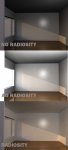
herewith The settings work fine but I did notice that the render with AO looked brighter then radiosity settings ?

Also the render times are about 5 times longer that with just the distant light !? ( is this normal ?)

Regards

Luke

PS: If the render times are this long, then I'm curious to know how Peers 8 core shapes up, as I'm toying with the idea of getting one myself in the next few weeks
 

Attachments

  • TEST.jpg
    TEST.jpg
    26.8 KB · Views: 507
With 4.2, am I correct in assuming that radiosity is built into the skylight? It won't allow me to add a radiosity tag to a skylight so I assume it must be inherent but, at the same time, I don't see a place to edit the radiosity settings. Am I missing something obvious?
 
With 4.2, am I correct in assuming that radiosity is built into the skylight? It won't allow me to add a radiosity tag to a skylight so I assume it must be inherent but, at the same time, I don't see a place to edit the radiosity settings. Am I missing something obvious?
You add radiosity tags to cameras, not lights.
 
Back
Top