-- material and render

keebOo

0
Messages
29
-- material and render

Hi to all again,
I'd like to understand better how to change the properties of material to create a "chrome-like" metal material and a "porcelain-like" material.

What about the different "reflection/specular" angles viewed by the camera in rendering?


here you can find what I mean:
http://content.luxology.com/modo/201/video/renderProject.mov

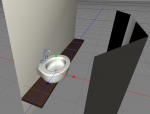
I make a simple scene (not so beatiful and refined as in the tutorial above :) ..but to understand is ok...) and I add the different material to all the object.

The material is the standard (I don't change anything), so you can change everything to have a similar result.


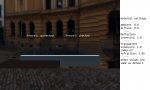
I try to make something similar (add emission to the 2 light panel, changing the property of specular/reflection and ambient of material, add radiosity ambient occlusion/radiosity, switch off camera light, add other area light on top....) but I can't make realize the porcelain and chrome as in (similar) the tutorial above.


COULD YOU HELP ME and try to make it for me? (simply change the material property/camera property/ light property)
 

Attachments

  • basin.jas.zip
    17 KB · Views: 644
  • simpleScene.png
    simpleScene.png
    98.5 KB · Views: 984
Hi,
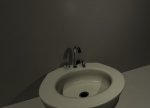
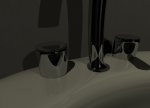
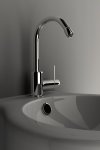
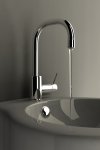
Here is a quick try. When you want chrome you need to set the coler to black or almost black. and the reflection to around .780. Very nice model.

Thanks,
Greg

Sink.jpg

Sink 2.jpg
 
Hi,
Here is a quick try. When you want chrome you need to set the coler to black or almost black. and the reflection to around .780.
Thanks,
Greg

could attach the jas file to see the parameter of all objects?

what about the porcelain mat?


btw... thanks. :)
 
Last edited:
Hello. I also tried to make same scene of that tutorial movie with Cheetah3D.

for porcelain material, I set reflection angle to 3, reflection intensity to 0.12, and Emissive color to 10% gray. I use Emissive color for adding more white to White color object in dark scene. please check attached file for more details.

tg_jp, Hiroto.
 

Attachments

  • ch_20061116_sink.jpg
    ch_20061116_sink.jpg
    14.7 KB · Views: 1,024
  • sink.jas.zip
    42.2 KB · Views: 729
Hi,
That looks great Hiroto. Sorry I didn't post, I don't know how to post .jas files:?:oops::D.

Thanks,
Greg
 
for porcelain material, I set reflection angle to 3, reflection intensity to 0.12, and Emissive color to 10% gray. I use Emissive color for adding more white to White color object in dark scene. please check attached file for more details.

great render HIROTO !
thanks. :)

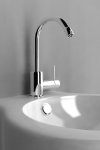
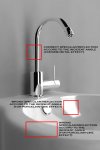
other question: how to change the diffuse/reflection/specular amount of material according to the incident angle of the surface to the camera? (chrome: faceing the surface --> reflection, porcelain: faceing the surface --> no reflection)

(to understand what I mean... -- sorry for my poor english -- ... see the .mov link above, around minute 6)


BTW... great render, I like it!

keebOo


note: the .mov link --> http://content.luxology.com/modo/201...derProject.mov
 

Attachments

  • note.jpg
    note.jpg
    23.8 KB · Views: 946
Greg.
You can´t post jas-files, but you can make archives of it and post the xyz.jas.zip-file, as we others do.

With kindest regards
Frank
 
Ahh... I see. Thanks for the tip:icon_thumbup:. I don't think I'll post mine( It dosen't compare with Hiroto's).

Thanks,
Greg
 
Hello.

I tested some scene, so I think current version (v.3.5) cannot render a scene with changing the diffuse/reflection/specular amount of material according to the incident angle of the surface to the camera.

I want to the option for this to next update, too. ;)

but you can render transparent material with changing relfection <-> transparent according to the angle (acutually, you cannot control amounts, but just On/Off). please check attached sample pic.

>Hello, Greg.
thanks for comments. :smile:

tg_jp, Hiroto.
 

Attachments

  • ch_20061118_fresnelSamp.jpg
    ch_20061118_fresnelSamp.jpg
    51.8 KB · Views: 919
Last edited:
Hello. I also tried to make same scene of that tutorial movie with Cheetah3D.

for porcelain material, I set reflection angle to 3, reflection intensity to 0.12, and Emissive color to 10% gray. I use Emissive color for adding more white to White color object in dark scene. please check attached file for more details.

tg_jp, Hiroto.

That looks soooo really nice...it just looks right reat work

Regards

Luke
 
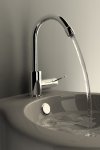
SinkTwice;-)

Hi,
I like the capabilities of HDRI and AO. No additional lights used, just an gradient white-to-grey HDRI and ambient occlusion. I cut off the polys where the SolidColor lights were set before.

With kindest regards
Frank
 

Attachments

  • SinkTwice.jpg
    SinkTwice.jpg
    26.4 KB · Views: 725
-- uuuaaauuuuu!!

Hi,
I like the capabilities of HDRI and AO. No additional lights used, just an gradient white-to-grey HDRI and ambient occlusion. I cut off the polys where the SolidColor lights were set before.

With kindest regards
Frank

This is awesome! :)

pls, could we have the jas file to understand better?
thanks.

P.S. (the hdri that u use it, it's free or commercial? where do you find/ make it?)
 
Hi KeebOo,
the hdri I made by myself is too large for an upload, sorry, but I find another way. This advanced rendering, with further little detailes has the attached gradient tiff put into the hdri-tag.
So this will work either.

With kindest regards
Frank
 

Attachments

  • Sweet_Water.jpg
    Sweet_Water.jpg
    34.4 KB · Views: 696
  • DustGreyToWhite.tif.zip
    18.4 KB · Views: 646
thx

Hi KeebOo,
the hdri I made by myself is too large for an upload, sorry, but I find another way. This advanced rendering, with further little detailes has the attached gradient tiff put into the hdri-tag.
So this will work either.

With kindest regards
Frank

Thanks thanks. thanks a lot. :)

This render is wonderful, also with a tiff image (and not a hdr),
and the water is..... real! :)


btw... If I make a render like this with only a "fake" hdr, for me It's really a great gift... I have an old titanium 867Mhz, 756Mb ram, and until the next (probably a core 2 duo :) ) the rendering it's really a long-long-long step :)

keebOo.


later note:
can I have also the jas file to see the details on scene?
or maybe a screenshot of the scene?
 
Last edited:
Hi Frank,
absolutely awesome. :smile: The water gave it the last touch. Great.

Bye,
Martin
 
Hi Frank,

perfect ... awesome! :icon_thumbup:

This looks really realistic.

Very nice ideas to put an gradient in the hdri-tag and leave the water tap running.

Are the textures for the water, chrome and the ceramic are shaders?

Nice reflections on the water tap.

cheers
Wolfgang
 
Thanks, but Hiroto (tg_jp) started this scene very clever!
I´ve just fill in my comments.

@wal
Yes these are internal material shaders of Cheetah3d, nothing else.
And the gradient tiff is simply done with every bitmap editor.

@KeebOo
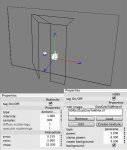
Here´s the scene, as I allready said, just cut out some holes for the light and if you like; a ceiling. That´s all.

With kindest regards
Frank
 

Attachments

  • SweetWaterScene.jpeg
    SweetWaterScene.jpeg
    52.6 KB · Views: 658
Frank --

Have to agree with Martin there -- that water detail is soooo sweet!!:icon_thumbup:

(Fresnel & Refraction? At a guess?)
 
Hi All,

Here's my render, I just had to try this great scene as well. Same setup as Frank. I only added some water as well. Including the bubbles.

Regards,

Peter
 

Attachments

  • Sink01.jpg
    Sink01.jpg
    35.9 KB · Views: 655
Gorgeous!

While I think that the water jet is to static in all posted pics.
Especially if you have bubbles within the jet then the jet would be disturbed as well. (at least a little)


-DaVinci
 
Back
Top