

Several questions

Messages
20
Several questions

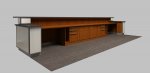
Martin - first off, let me say what a wonderful piece of software Cheetah3D is. Every time I use it I learn a little more and am amazed at its potential and ability. I work for an architecture firm and have been modeling a reception desk for a new office building in Sketchup and then bringing it into Cheetah to render. I have two questions: Is there any way to link to files in a referencing kind of way, as in Illustrator, AutoCad, 3D studio, and I'm sure many others? It would be a useful thing to be able to model/manipulate things separately and bring them together for a final rendering. Several times I have had to make changes and then go through the process of re-mapping all of the materials with their various UV scales and rotations, which is less fun the 3rd or 4th time around. Second, Is there a way to make a material have luminance and emit light energy based on that luminance?

Randolph
 

Attachments

  • desk back small.jpg
    desk back small.jpg
    166.4 KB · Views: 616
Can't this be done by using the SmartFolder function in the latest version of Cheetah...

Add a SF to the ObjectBrowser and then assign the file that you are using as the linked file... then every time you re-export the file for the other app it will re-update in Cheetah...

That is a beautifully lit render Randolph... what were your settings to get those nice drop offs of the shadows etc... ?

cheers
Trevor
 
Last edited:
Randolph said:
Is there any way to link to files in a referencing kind of way

If you have version 3.1, you can use the "Smart Folder" which is doing exactly what you want. Look at the description in the help file.

Randolph said:
Is there a way to make a material have luminance and emit light energy based on that luminance?

You can use the SolidColor material
 
Thanks for those suggestions. I'll try to see about using them with the model I'm working on. I've been working in v2 but just upgraded to 3 two days ago and haven't had the time to look through the new features.

The lighting for the scene is pretty simple: 1 area light, which is where the soft shadows come from, and an HDR as a fill light with the background unchecked and rendered with a transparent background. the scene is rendered with radiosity 2550 x 1500 pixels and takes about 11 hours.

Randolph
 
Hi Randolp,
if you render images wiht radiosity in a high resolution it often helps to increase the "error" value of the radiosity tag. With high resolutions Cheetah3D tends to calculate to much samples. I will try to fix that resolution dependence.

By,
Martin
 
smart folders

TrevorM-L / Martin -

I have been trying to get the smart folder to serve the purposes I outlined in my original post but am having some difficulties. Specifically, I have built this model in Sketchup, exported it as an fbx file and then linked to that expoted fbx file in the smart folder. So far, so good. The model comes in just the way I would expect if I were importing it directly. Now, several of the materials I am using need to have adjustments to the UV scale and UV rotation - the eucalyptus wood and the granite countertop. In the smart folder, in the material for each mesh, I have been changing these values. After saving the file, however, and reopening, all of the material UV values have reverted back to their original values, as though I have re-imported the file. Since the purpose of using the smart folder for me was to avoid having to re-assign all those values and orientations, how can I configure the smart folder to suit my purposes?

Thanks,

Randolph
 
Randolph said:
Now, several of the materials I am using need to have adjustments to the UV scale and UV rotation - the eucalyptus wood and the granite countertop. In the smart folder, in the material for each mesh, I have been changing these values.

If you adjust the UV scale/rotation in SU (right click on the face with the material / Texture / Position), then you will not have the problem. And the Smart Folder will work the way you want.

Randolph said:
After saving the file, however, and reopening, all of the material UV values have reverted back to their original values, as though I have re-imported the file. Since the purpose of using the smart folder for me was to avoid having to re-assign all those values and orientations, how can I configure the smart folder to suit my purposes?

The purpose of the Smart Folder is to reload everything. If you want to go your route (changes in C3D), then , once you are done with your model structure changes in SU, you can convert the Smart Folder into a standard folder (see the note in the help file) and do your UV changes in C3D. Then you can save your C3D model as a .jas file and your UV values will be kept/save
 
Francois said:
If you adjust the UV scale/rotation in SU (right click on the face with the material / Texture / Position), then you will not have the problem. And the Smart Folder will work the way you want.


The purpose of the Smart Folder is to reload everything. If you want to go your route (changes in C3D), then , once you are done with your model structure changes in SU, you can convert the Smart Folder into a standard folder (see the note in the help file) and do your UV changes in C3D. Then you can save your C3D model as a .jas file and your UV values will be kept/save

But, but, but, but....

In that case, a Smart Folder is just re-loading the FBX each time -- in exactly the same way as going to the File menu and selecting 'Import...'

I thought the whole point of SF's was to to keep the material assignments made in Cheetah, whilst allowing you to make geometry changes in SU.

(See my other thread about Smart Folders)
 
Back
Top