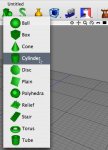
Cheetah3D toolbar icons?

Do you like the Cheetah3D toolbar icons?

  • Yes, I like them. They are perfect.

    Votes: 12 66.7%
  • No, they are to colorfull and inconsistent.

    Votes: 6 33.3%

  • Total voters
    18
  • Poll closed .

Martin

Moderator
Messages
9,479
Cheetah3D toolbar icons?

Hi,
since I get some complains about the color scheme of the Cheetah3D toolbar icons from time to time I'm interested what you think about it. Every comment or advice to improve the icons is very welcome. So here is my question.
Do you like the Cheetah3D toolbar icons?

By,
Martin

P.S. I've restarted that poll since I made a mistake setting up the first poll. This one is a secrect poll now. If you've already voted in the first poll please vote again. Sorry for the problems.
 
Cheetah3D toolbar icons?

hi there,

i`d prefer "text-icons" like softimage has or
pixelputty some years ago (now = pixels3d).
no pics. and they should be smaler than the ones
we have now. just proposing!

have a nice day
stefan
 
Hi,
do you have an example (screenshot) for a "text-icons"? I'm not sure what you mean. But it doesn't sound very Mac OS X like.

By,
Martin
 
ok that was confusing.
what i mean is simply buttons with text
and pop-up menues but no little pictures.
(i can`t see them anymore)
see example: (i hope the upload works)

cheers
stefan
 

Attachments

  • Bild 1.png
    Bild 1.png
    54.3 KB · Views: 813
Cheetah 3D first impression

Hi Martin
I’m a big fan of Cheetah 3D and can spend hours comfortably working with out even noticing the tool bar. The interface is very clean and unobtrusive and everything just works soooo smoothly.

About two years ago I came across Cheetah 3D version 1.xx, while I was searching for a simple 3D program to replace an aging Adobe Dimension and Ray Dream Designer for my basically 2D work flow. My first impression when I opened Cheetah 3D was that this was a very basic software program for young children. Really. What I saw was a small number of large, child like tool icons in bright primary colors without even one floating tool palette. My god there is even a silly cow in the tool bar. Then I checked Cheetah’s Preferences palette. Not much there either. So in a moment of blinding ignorance, I wrote Cheetah 3D off as an inexpensive children’s program and trashed it. Unfortunately it took me almost two years to rediscover it.

Looking back now, I would have to admit that I - like many others - are Adobe bigots, and pretty much judge the interface and quality of every other program by that criterion. Floating tool bars with floating, collapsing pallets all in Black and white/grey or sedate colors with very basic icons.

I only mention the above because there are many other 2D designers - as short sighted and as bigoted as I was - not content with Illustrator’s rudimentary 3D capabilities and searching for an alternative. I believe Cheetah 3D should be that program. From a business prospective, those potential clients and resources could equate to faster development cycles for Cheetah 3D.

Just my 2 cents worth.

Best regards,

P.S. I love the cow and someday would like to hear the story of its origin.
 
stefan said:
what i mean is simply buttons with text
and pop-up menues but no little pictures.

Hi Stefan,
thanks for the screenshot. Now I understand what you mean. But I want to stay with the Mac OS X standard toolbar. The toolbar Softimage uses is actually not very "Mac OS X ish". Sorry.

By,
Martin
 
Hi irev,

irev said:
What I saw was a small number of large, child like tool icons in bright primary colors without even one floating tool palette. My god there is even a silly cow in the tool bar.

you exactly got my concerns and what I get to hear from time to time. Some people simply evaluate Cheetah3D by it's icons. That something like the "First impression counts".

irev said:
Looking back now, I would have to admit that I - like many others - are Adobe bigots, and pretty much judge the interface and quality of every other program by that criterion. Floating tool bars with floating, collapsing pallets all in Black and white/grey or sedate colors with very basic icons.

OK, I won't switch to floating pallets. But maybe other icons or another color scheme might already help a little bit. Any idea how a "Pro" icon looks like. But please no "Black and White" ;)

irev said:
P.S. I love the cow and someday would like to hear the story of its origin.

You want to hear the story behind cow icons? Here it is:

The first public application I wrote was a shareware game called TheCowCatchingGame (see first attachment). As the name already implies it was about catching cows.

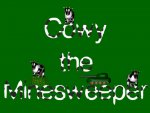
The second app I wrote was a game called "Cowy the Minesweeper" (see secons attachment). You might already expect it. It was about cows again;)

The third app I wrote was Cheetah3D. OK, Cow3D would have bee really silly. :-D But a app without a cow? No. And since I had no idea how a render icons looks like the (render) cow icon was born.

But maybe I should replace it with a cheetah head nowadays.

By,
Martin
 

Attachments

  • TCCG.jpg
    TCCG.jpg
    52.4 KB · Views: 759
  • CTMS.jpg
    CTMS.jpg
    56.5 KB · Views: 765
icons

Dear martin

I think the interface is brill, I spent some four years on web design in the early days when icons where being established for everything you could imagine and the mac interface has got the best icons in the business.

Your program looks and feels like a native mac program which makes it so special, you just need to look at silo, carrera etc to see how user friendly yours looks.

If your are going to modify then make subtile changes as people (like me) are creatures of habit and change for change sake is always a bit of a shock (unless it really is better for the program)

Re the Cow, well that makes sense but could need rethinking if you make the app ready for multiple mchines (render cow !)

So to some up there's not a lot wrong with it in my book...Oh..more drag an drop would be great like jpgs in the materials editor and the ability to save the materials in a custom libary would be very very appriciated.

regards

Luke
 
Hi,
luke Bocchinelli said:
Your program looks and feels like a native mac program which makes it so special, you just need to look at silo, carrera etc to see how user friendly yours looks.

Thanks.

luke Bocchinelli said:
If your are going to modify then make subtile changes as people (like me) are creatures of habit and change for change sake is always a bit of a shock (unless it really is better for the program)

That's true.

luke Bocchinelli said:
So to some up there's not a lot wrong with it in my book...

I'm happy to hear that.

luke Bocchinelli said:
Oh..more drag an drop would be great like jpgs in the materials editor and the ability to save the materials in a custom libary would be very very appriciated.

Material libraries will come once I'm done with the new material system.

By,
Martin
 
Hi Martin

Thank you for sharing your wonderful and personal story with us on how the Cow became the render icon. I now understand the legacy and symbolism of this icon.

Martin said:
Hi irev,

Any idea how a "Pro" icon looks like. But please no "Black and White" ;)

By,
Martin

I would never presume to tell you what Cheetah 3D icons should or should not look like. I apologize if I gave you that impression. My post was simply to share my first impressions of C3D with you, thinking that others might have had a similar experience and consequently have missed out on your great program.

The roots of color bigotry
The ‘Adobe bigots’ I was referring to in my original post would be the designer that for the most part publishes to press and/or does photo correction. This would be the group that have their work space adorned in grey and black. This includes walls, carpets, monitors and hoods, desks, keyboards and even their clothes. Heck, my office windows are covered with black curtains and I’m wearing a black shirt.

The reason for this is color fidelity. Any color/light on the screen - reflected or other wise - can influence the eyes when color proofing. The wrong color/tint sent to press could literally mean thousands of dollars of losses. That’s why the only place you’ll find color in Adobe software - InDesign, Illustrator, Photoshop etc.- are in their color palettes exclusively. Hence, the origins of this group’s bigotry. Please disregard if you already were aware of this.

Of course color fidelity is far less important to designers in other creative fields and shouldn’t really be a big issue with them. It may be of interest to note that the people who moaned the loudest to Apple about OSX’s bright Aqua interface was this very group - the bread and butter of Apple for many years. Could be why Aqua had such a short run?

Possible solution?
Not being a programer, I wouldn’t know how difficult or time consuming this suggestion would be to implement so please for give my ignorance. But, what if there was a second set of Tool Bar icons available, identical to the ones CD3 has now but instead in grey scale tones? The choice of Color icons or Grey scale icons in the Tool Bar could be implemented by the user by simply checking a box in the Customize Tool Bar window.

Might just appease the “Vampire by Day” crowd. ;)


Just my 2 cents worth.

Best regards,
 
Errors in toolbar

Hi Martin.

Here are my observations on the toolbar. Overall I think they are acceptable, but they do look a little playful and out of focus. They should maybe be more like Apple's Motion, example attached. I have however found problems with the menu bar. Not sure if its just me? When you set the toolbar to text only, most of the sections are not available (light gray). Also if the icons are set to "use small size" only the icons on the left and right change size, circled in red.

cheers
W
 

Attachments

  • text_only.jpg
    text_only.jpg
    11.2 KB · Views: 597
  • small_icon.jpg
    small_icon.jpg
    13.9 KB · Views: 578
  • apple_motion.jpg
    apple_motion.jpg
    12.4 KB · Views: 589
Last edited:
irev said:
Possible solution?
Not being a programer, I wouldn’t know how difficult or time consuming this suggestion would be to implement so please for give my ignorance. But, what if there was a second set of Tool Bar icons available, identical to the ones CD3 has now but instead in grey scale tones? The choice of Color icons or Grey scale icons in the Tool Bar could be implemented by the user by simply checking a box in the Customize Tool Bar window.

Hi,
that's actually a solution I also thought about. Maybe that would be the ultimate solution to the problem.

By,
Martin
 
wynand said:
I have however found problems with the menu bar. Not sure if its just me? When you set the toolbar to text only, most of the sections are not available (light gray). Also if the icons are set to "use small size" only the icons on the left and right change size, circled in red.

Hi wynand,
that's all true what you said. And you are not the first who complained about it. So I finally took the time and fixed all these toolbar problem.

The toolbar is now much more like in Apples Keynote or Pages.

-"use small symbols" works
-texmode works
-popup menus instead of the old icon panels
-small triangles at the lower right to indicate expandable toolbar items

See the screenshots.

By,
Martin
 

Attachments

  • Cheetah3DSchnappschuss001.jpg
    Cheetah3DSchnappschuss001.jpg
    15.7 KB · Views: 580
  • Cheetah3DSchnappschuss003.jpg
    Cheetah3DSchnappschuss003.jpg
    10.7 KB · Views: 574
  • Cheetah3DSchnappschuss002.jpg
    Cheetah3DSchnappschuss002.jpg
    47.5 KB · Views: 576
"-"use small symbols" works
-texmode works
-popup menus instead of the old icon panels
-small triangles at the lower right to indicate expandable toolbar items"


hi,

my wishes come true with that!
thank you martin!

have a nice day
stefan
 
Astounding conclusion to poll

It has been close to a week since the last person voted in this poll, so it’s the perfect time to jump to a baseless conclusions. I’ll take the first leap. Please note: All my unquestionable assumptions and the final conclusion were divined from the pattern of green tea leaves stuck to the bottom of my cup - or was it from that other little bag of green . . .

The majority of the 18 respondents if not the total respondents that voted in this poll:
1) are individuals that regularly or semi regularly participate in this forum.
2) are registered owners of Cheetah 3D.
3) are a representative sample of all the registered owners of Cheetah 3D.

Conclusion:
One third of all individuals that purchased Cheetah 3D, purchased it thinking that the Tool Bar icons were “to color full and inconsistent.”

Best regards,
 
Last edited:
irev said:
One third of all individuals that purchased Cheetah 3D, purchased it thinking that the Tool Bar icons were “to color full and inconsistent.”

I expected something like that. Since I get quite some complains about the icons. The question is how many don't give Cheetah3D a real test drive because of it's icons. If only 10% trash it just because of it's icons it is already to much. On the other side is it difficult to make icons everybody likes. I think it is best to have icons which aren't noticed immediately. So people don't perceive if the like the icon or not. So less powerful colors are probably better.

By,
Martin
 
Back
Top