node request

archie

0
Messages
1,266
node request

there are two basic texture nodes missing that are standard in many other apps.

first being a simple tile/grid node, looking like the wireframe but not connected to the polys but freely scalable like the brick and checkerboard.

second being a weave node for fabric material, this one needs a not shadowed option for transparency input.
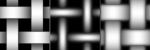
Bild 3.png
 
... and the other thing i need all the time (and others have asked for too) and am unable to emulate within the current system is a scratch node.

metal-scratch.jpg
 
yes, this two nodes would be very useful!

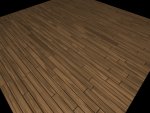
I'm adding the request for an "offset" control for the Brick node, to be able to create parquet shaders, for example

thank you,
Alessandro
 
...like this ?

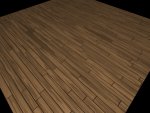
yes, but with random position of the cross joints and (possibly) random length of the wood pieces

EDIT: I just took a deeper look into your parquet shader... brilliant combination of Cellnoise+Checkboard textures Archie:icon_thumbup: , you can't imagine how long I tried to emulate this look without success!
 
Last edited:
lengthy shifting

yes, but with random position of the cross joints and (possibly) random length of the wood pieces

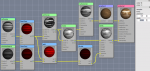
ok so i couldn't get an elegant solution but a node mess that works. :smile:
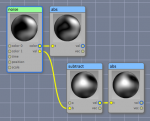
it turns into a mess because the brick node needs another scale (x0.25) and also each second row has to be shifted by 0.125 (checkerboard)...
please notice that you could always do away with the whole lower node row including the brick because this only accounts for the gaps and a real parquet is glued together and polished, so no gaps...

basically the first cellnoise shifts each row (of wood panels) by a random (grey-)value, but the length of the panels is equal.
if you want to change this you need to tune the x-scale of this node to a value bigger then 0.001, say 1 :smile: , than the shifting value will change in each unit and you end up with various lengths of the panels (bigger values give an awkward result though and smaller an effect too little).
this of course increases the probability of joints meeting where they shouldn't...

View attachment parquet2.c3dmat.zip
1.jpg
2.jpg
Bildschirmfoto 2010-02-11 um 11.33.32.png

-

parquet4.jpg
 
Last edited:
very cool Archie, I'm impressed :icon_thumbup:

I would have had no clue how to get there without your help...

cheers,
Alessandro
 
I have to say (1) this is brilliant and (2) it would be much easier to implement using an "expression" node (i.e. one that simply lets you write code to express what you want).
 
it would be nice to have a text node where you can type in text (textedit.app-style) and maybe also simple vector forms (cheetah texture paint style) that then are used in uv mode like the image node without going the way of a bitmap texture, applying the vector information directly for better scalability (there need to be a smoothing option for bump output).

- archie
 
Gradient can step values.

Nodes that let you rearrange parts of bitmaps in different ways (Groboto does this brilliantly) would be very useful.
 
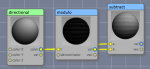
the wireframe is a powerful node that could easily be made even more powerful by adding seam and crease draw options to iso and edge.
all uv materials have problems with seams that could be tackled when a node made those accessible, also hard corners in the geometry as indicated by creases could be made showing different effects (you can make a cube now with shiny edges but no more complicated geometry).

another thing: i need three(!) nodes to multiply four values !
maybe there could be an *add another factor* expansion possibility for the input of multiply, add etc ?

- archie
 
Last edited:
MultiplyAdd drives me nuts. I still can't figure out exactly what it's supposed to do. I shudder what folks without math backgrounds make of it. (Is it a*b + t, or a + b*t or ??? I seem to recall experimenting with it at length to try to figure it out and reaching a conclusion, but I did not write it down.)
 
Is it a*b + t, or a + b*t or ???

well on a good day it's a*t+b, on other days we use two nodes... :rolleyes:

a bug that cannot be fixed because that would break all existing materials:
the output range of the noise, fractal etc exceeds the limits, when you may think it's 0 to 1 like indicated by the b&w colors it's actually something like -0.5 to 1.5 (!), and there are definitely mathematical operations that don't like negative inputs; also when you add a gradient for clipping you surely see the clipping plateaus in the bump...

Screen shot 2010-08-06 at 9.49.50 PM.png
 
MultiplyAdd drives me nuts. I still can't figure out exactly what it's supposed to do. I shudder what folks without math backgrounds make of it. (Is it a*b + t, or a + b*t or ??? I seem to recall experimenting with it at length to try to figure it out and reaching a conclusion, but I did not write it down.)

I always thought it was a*b+t (multiply...add) but if you tell me so now I'm not sure anymore.
I remember using MultiplyAdd to convert a [-1;1] range input into a [0;1] output not so long ago... I plugged [-1;1] in a, set both b and t to 0,5 and it (apparently) worked fine...:confused:
 
Multiplyadd is confusing as hell and the noise output range is scary. Also note the uv state node bug I mentioned elsewhere.
 
Last edited:
OK, so here's a question. If most of the math nodes are as simple as a*b+1, why is it that we have no help info on them. Even if that was what was all that was provided for MultiplyAdd, it would help those who aren't math gurus.

Example:

MultiplyAdd: a*b+1, where the range is from -1 to +1


It took me more time to type this threat input than it would that one-liner. Thoughts?
 
Back
Top