![]() |
|
|
(#1)
|
|
|
Neuer Benutzer
Posts: 14
Join Date: 27.03.2009
|
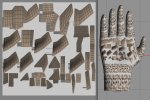
When I bake on textures I'm getting some faces that come out looking sort of translucent where it should be colored. Here is an example of what i'm talking about. Any clue what i'm doing wrong to cause this? I'm baking textures with the following settings:
pixel border 4 Channels: Color Diffuse ![]() Thanks for your help! |
|
|
|
|
(#2)
|
|
|
Erfahrener Benutzer
Posts: 9,814
Join Date: 12.07.2005
|
Hi.
Seems the workflow is somewhat broken. Hereīs a reading about it with a link to a script, which will solve your prob - hopefully - called UV-stepper.js: http://www.cheetah3d.de/forum/showth...texture+baking With kindest regards Frank |
|
|
|
|
(#3)
|
|
|
Neuer Benutzer
Posts: 14
Join Date: 27.03.2009
|
Thanks Frank, I've looked through the threads you posted but I still don't understand what is causing this. Also, I don't really understand what UV stepper does and how it would solve my problem. My texture seems to be aligned properly it's just showing a few faces (maybe 10) with a whitish/grey triangle as seen above.
|
|
|
|
|
(#4)
|
|
|
Erfahrener Benutzer
Posts: 9,814
Join Date: 12.07.2005
|
The UV-stepper lets you swap your texture from UV2 to UV1.
Then it should appear properly attached to your mesh. I think youīre rendering shows the tiled texture. Cheers Frank |
|
|
|
|
(#5)
|
|
|
Neuer Benutzer
Posts: 14
Join Date: 27.03.2009
|
Ok, i'll give it a try and post my results in case anyone else has this issue. What do you mean tiled texture?
|
|
|
|
|
(#6)
|
||
|
Erfahrener Benutzer
Posts: 9,814
Join Date: 12.07.2005
|
Quote:
Thatīs what I usually get, with out swapping. Cheers Frank |
|
|
|
|
|
(#7)
|
|
|
Neuer Benutzer
Posts: 14
Join Date: 27.03.2009
|
Ok, I've downloaded the UV Stepper and used it and it still comes out looking the same.
Here is what I did..... 1. Added bake tag 2. Switched to face mode. 3. Click "create" on UV 2 4. Click Render>Bake texture 5. Save the baked texture 6. Deleted the original materials 7. Used the UVStepper.js to swap UV2 to UV1 8 Applied new baked texture Still getting the funky scattered whitish faces. What am I doing wrong to cause them? Thanks |
|
|
|
|
(#8)
|
|
|
Erfahrener Benutzer
Posts: 9,814
Join Date: 12.07.2005
|
7. generate new material, assign baked texture and apply to object.
8. Call UV stepper script: "SwapUV1 to UV2"; hit copy and you should instantly see your baked texture on your mesh. So, was your object also set to UV1 while swapping? Cheers Frank |
|
|
|
|
(#9)
|
|
|
Neuer Benutzer
Posts: 14
Join Date: 27.03.2009
|
Yep... Thats exactly what I'm doing, including the steps you added.
Here is the before shot: ![]() Here is the after shot: ![]() See how everything matches but I'm getting those weird white faces scattered throughout? |
|
|
|
|
(#10)
|
|
|
Erfahrener Benutzer
Posts: 9,814
Join Date: 12.07.2005
|
Hi.
Can I have a look into your file including the textures? If so please send it to frank-beckmann "at" hamburg.de Cheers Frank |
|
|
|
![]() |
| Thread Tools | Search this Thread |
| Display Modes | |
|
|