![]() |
|
|
(#1)
|
|
|
Erfahrener Benutzer
Posts: 102
Join Date: 12.02.2012
|
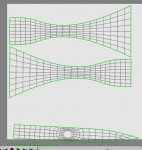
I am trying my first attempt at UVMapping and have found that when I unwrap the head of my axe it's off the page. What can I do to either make the page bigger or be able to move the maps up onto the page. I know about the 'select all' and moving them around, but I can't do that if I can't select them.
![]() |
|
|
|
|
(#2)
|
|
|
Erfahrener Benutzer
Posts: 1,038
Join Date: 18.12.2006
|
First go to edge mode, then area select or select all - then you can scale and move
|
|
|
|
|
(#3)
|
|
|
Erfahrener Benutzer
Posts: 102
Join Date: 12.02.2012
|
Thank you novolume that worked.
![]() |
|
|
|
|
(#4)
|
|
|
Erfahrener Benutzer
Posts: 102
Join Date: 12.02.2012
|
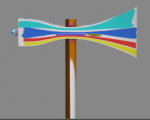
new problem. Did a quick texture and this is the result. Where did I go wrong?? The studs came out alright cause the whole page was the one colour, but when I tried to colour individual things this happened.
There were the steps I took to make the UVMaps. 1. Layout..>UVEditing 2. in line mode marked out the seams 3. >toggle seams 4. >UV unwrap Then because the head of the axe was off the page. 5. used area select and select all to move the pieces into place. 6. >save UVMap PDF I know I must be missing a step here somewhere. Thank you ![]() |
|
|
|
|
(#5)
|
|
|
Erfahrener Benutzer
Posts: 182
Join Date: 07.04.2011
|
Did you manage to solve this? If not send me the file and I will show you what to do in the future.
Mike |
|
|
|
|
(#6)
|
|
|
Erfahrener Benutzer
Posts: 102
Join Date: 12.02.2012
|
Thank you Mike, give me a day or two and I'll send the file over, your help would be greatly appricated with this.
I've had to take my computer back to 'default' and am still putting everything back on, but I'm pretty sure I have saved the files onto a disc, just have to find it. ![]() |
|
|
|
|
(#7)
|
|
|
Erfahrener Benutzer
Posts: 182
Join Date: 07.04.2011
|
No problem.
Mike |
|
|
|
![]() |
| Thread Tools | Search this Thread |
| Display Modes | |
|
|