Arbaro

archie

0
Messages
1,266
Arbaro

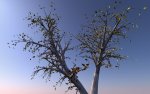
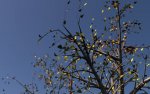
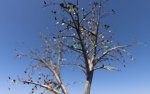
WmH has pointed me to Arbaro (and provided two great images), a nice free tree generator, already featured by peer on this forum long ago.
Now we have many new users and I would like everyone interested to share experiences here.
It works nicely with a smartfolder in cheetah, every time you render in arbaro you can check the actual appearence in the cheetah editor.
Render times get long of course, and for closeups texture mapping is obviously required.
I have not yet finished a postable result, below is the standard *lombardy popular*, suitable for sketchy type scenes.
The leaves are exported in a separate object, so you can tweak them with normal scale etc. or triangulate squares and crumple for bent leaves.

Contributions appreciated !
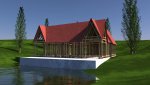
squarehouse4.jpg
 
Last edited:
nice start, Archie!
for the first day you're really getting in touch with Arbaro...

hope to find the time to follow you there...:smile:

Cheers,
Alessandro
 
I'm totally in love with this little app!
After 24 hrs already some neat results,
so big thanks to WmH !

arbo7.jpg
arbo6b.jpg
 
Last edited:
woof

So no-one is sharing their rendered trees with me here ?

That's very sad.

I'm barking and leaving now.

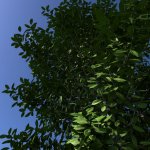
The bark is not yet finished, but for the leaves I made a neat bumpmap in order to achieve really prohibitive render times.

And it works ! :tongue:

Only I don't like it cause the things are not bent, but for leaf bending I need more than one quad.

Maybe I do an unbumped texture on a once subdivided and crumpled triangle or whatever.

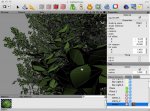
leaftest3.jpg

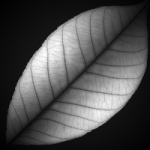
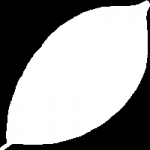
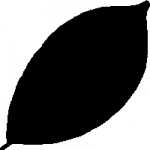
LeafBmp.png LeafSpc.png LeafTnp.png

Really nice. I like the depth of field effect too. How did you do that?

Hi Jon, thanks for stopping by;
there is a Depht Of Field tag in Cheetah that does the trick !
 
Last edited:
You might also try a specularity map to see if you can emulate curvature through shading effects.
 
You might also try a specularity map to see if you can emulate curvature through shading effects.

Thanks Robert,

yes, it has specular, bump and transparency maps, but no color texture, so you can always change the color.
I spent quite some time in photoshop with circular gradient overlays to make the bump map spherical. but when you look at a leaf from aside -
a plane is a plane !

Update:
Linear subD plus crumpling doesn't work nicely with texture maps, so I think for a closeup I simply have to select the closest leaves and catmull-clark them
(not done in the pic).

leaftest6.jpg
 
Last edited:
woof ll

Thank guys for your support ! :smile:

I know how to import the trees and I know how to alter the shape a bit, but I can't make it that realistic.

Jack, it's the bump map that does the trick.

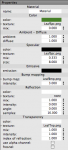
1. Render any Arbaro tree with leave shape = disc4 (hexagon) and UV set for leaves
2. Import the .obj in cheetah
3. Make new material with green color
4. Download the three maps from the above post
5. Throw the maps into the material with these specs:
Bild 1.png
6. Now put the material on the leaves object in cheetah and align it in the mat tag by adjusting UV scale and UV offset, UV rotation = 45, uncheck tiling
7. Select all faces, flip normals and triangulate
8. Apply crumpling normals at 0.001 once or twice
9. Set smooth angle of leaves object at 99 and choose phong smoothing

Now it should work...

I find this sufficient for mild close-ups and highres,
now I will wait with barking for the procedural shaders in Cheetah5 :p
 
Last edited:
Striking, particularly in the last image, you achieved a great sense of foreground/background depth (without using DOF blurring) and really nice shadow detail without sacrificing contrast.
Bravo!
 
Thank you for the tip, but I guess I have to learn more about Arbaro.
I can't alter the shape from the tree from the default one; the branches stay the same and the leaves keep being rowed up.
Could you give me some tips there?
 
Thank you for the tip, but I guess I have to learn more about Arbaro.
I can't alter the shape from the tree from the default one; the branches stay the same and the leaves keep being rowed up.
Could you give me some tips there?

Hey Jack
the shape of the tree can only be influenced IN Arbaro.
Now Arbaro doesn't show you the whole result before rendering, so it's best to start to render whatever tree and then open the user/x/default.obj (or else) by a Cheetah smartfolder. Now you can see the whole shape in the cheetah editor.
When you don't like , say, the branches you go back to the still open Arbaro and do some tweaking on the parameters there. Then hit render and Arbaro will overwrite the default.obj without asking and in Cheetah's editor an automatic update appears, so you can judge.
I have concentrated on the leaves lately and not yet begun shaping my own tree, so I don't know yet which parameters to change to what effect, still have to learn that myself, so sorry for no further help.

Update:
for altering branches: tree shape>shape; level1>branching>1DownAngle
It helps to load different default trees and to look how they made it, but it's no quick exercise because there are endless combinations possible - only trial, error and patience will do !
 
Last edited:
Yeah, I already got some better looking trees.
But now, I'm trying to figure out your tutorial for the leave texture.
I kinda stuck at point 6.
 
That's odd.
I don't see the bumpmap, even though the material is correct...

The bump map does not appear in the editor, only on the small material preview ball. When not there, maybe the value is too low ?

One more note:
Of course textured leaves appear smaller for the texture doesn't cover the whole leaf disc. But with all leaves selected in polygon mode this can easily be corrected with the normal scale tool.
 
Back
Top