


- Messages
- 672
Transparency + Fog Issue: Borders showing...
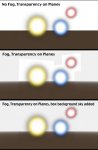
The goal is to have fog with transparency shaders that don't have a border revealing the plane it's mapped onto, but also to maintain the use of the simple plane instead of using some other more complex shape, if this is possible...
By itself, without fog, the transparency texture maps work well in the top image.:icon_thumbup:
In the middle image, fog is added to soften the farther objects and horizon, but as soon as fog is added, the borders are revealed.
In the bottom image, fog is still present, but a box sky is created around the objects, eliminated the borders of the orbs when visible in the sky, but they still show at the ground.
Is there a resolution to this issue so the orbs can be against sky and ground with fog, and not have their object borders appear as a semi-transparent box? Thanks.
The goal is to have fog with transparency shaders that don't have a border revealing the plane it's mapped onto, but also to maintain the use of the simple plane instead of using some other more complex shape, if this is possible...
By itself, without fog, the transparency texture maps work well in the top image.:icon_thumbup:
In the middle image, fog is added to soften the farther objects and horizon, but as soon as fog is added, the borders are revealed.
In the bottom image, fog is still present, but a box sky is created around the objects, eliminated the borders of the orbs when visible in the sky, but they still show at the ground.
Is there a resolution to this issue so the orbs can be against sky and ground with fog, and not have their object borders appear as a semi-transparent box? Thanks.
