Help with glitter gloss texture

pegot

0
Messages
896
Help with glitter gloss texture

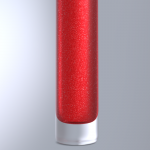
I'm trying to create a sparkling texture for a lip gloss cosmetics component. While I'm having fun with the new material system, I am struggling with it. At this point, anything interesting I get is pretty much by chance. Can anyone provide guidance in producing a texture similar to what's shown in the attached photo of the object I'm trying to reproduce?

I have also included a link to a short test animation I rendered. Just a WIP, though close to what I envision. The lip gloss material in it, however, is too smooth.

http://gotlibdesign.com/c3d/LipGloss_c2_adjusted.mov

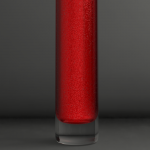
The still render is the same scene using a material closer to what I'm going for, but still not there. It seems more bumpy than glittery.

Any help appreciated.

Thanks.
 

Attachments

  • LipGlossTexture.jpg
    LipGlossTexture.jpg
    81.1 KB · Views: 540
  • LipGloss_renderd_textured.jpg
    LipGloss_renderd_textured.jpg
    22.5 KB · Views: 514
very cool Frank and Archie!

question after question we're putting together a nice material repo and guide guys! I like where the forum talks are leading us lately (if only every "office" was so collaborative...!)

cheers,
A
 
Hey guys, thanks for the material settings - Archie's is closer to what I'm striving for, though ideally I'd like some what of a middle ground between the two so I'll fiddle with them.

I am, in fact, already using an HDR image for lighting, as well as a skylight, a point light, and also an invisible object set to emissive material.

Just looking a the way you guys set up the nodes already gives me a little better understanding of the system - though I'm certainly eager for some documentation :)

One thing to note - Frank's material settings took a really long time to render compared to Archies. While Frank's screen shot only showed the noise parameters, I set the vector node to 0.98 / 0 / 0, which seemed to give me an equivalent preview.

Frank's settings took about 508 seconds to render on my system while Archie's only 100 seconds. Even my initial material attempt, which was way more complicated than it needed to be, rendered in a shorter time than Franks settings (132 secs). So I am wondering if the longer rendering time in Frank's material is due to the use of the math's power node?

Anyway - thanks again for these great materials - gives me a a firm base with which to move forward.

Attached is my object rendered with both the above materials. Note there are some shadow lines (much more pronounced in Archie's material) that I'd like to reduce or remove.
 

Attachments

  • franksMaterial.png
    franksMaterial.png
    77.4 KB · Views: 486
  • archieMaterial.png
    archieMaterial.png
    68.4 KB · Views: 485
Mine will take longer because I used the Bump channel as I thought it would benefit from it.

Cheers
Frank
 
hey pegot,

i used this hdri with a simple glass and a shadowmat plane and then tweaked the material settings until it looked like your pic.
for a different lightning setting like your scene you basically have to make a new material that fits.
it all starts with the noise texture, scaled to ~100, giving a similar distribution than the glitter in the red stuff. as it is more red than glitter you need to get more black than white in the noise, wich frank achieves by power node while i use a gradient for better finetuning.
then you have to translate the noise's black output into red and the white into glitter, for which you have to try reflection, reflection blur, specular and / or diffuse. i had good results with only noise > red gradient > reflection with no blur and diffuse set to simple red, but then dark dots appeared in shadow area so i added the gradient into specular too, and with reflection blur it even looked a bit better.
the shadow stripes in your render assumably result from your lightning setup which seems to be very complicated with three different light sources, they all interfere with the material setting and make tweaking very difficult.
i recommend to start with a simple hdri and then apply the material and try different values on the power or gradient.

happy tweaking,

- archie
 
Thanks for explaining all that Archie - it really helps me better understand what's going on. I will follow your advice, simplify the lighting (I think I was adding more lights because I was not getting much illumination from just the HDR and Sky Light - SL samples set to 1). I noticed my lighting setups from v4 (all with HDR & Sky Light) are not translating the same into v5 - everything appears much darker in v5. One animation I worked a lot on in v4 is completely off - I have been exploring it a bit trying to determine why there is such a difference and can't figure it out - but that's for another post.

Again - thanks! I'll post my progress when I make some.
 
Back
Top